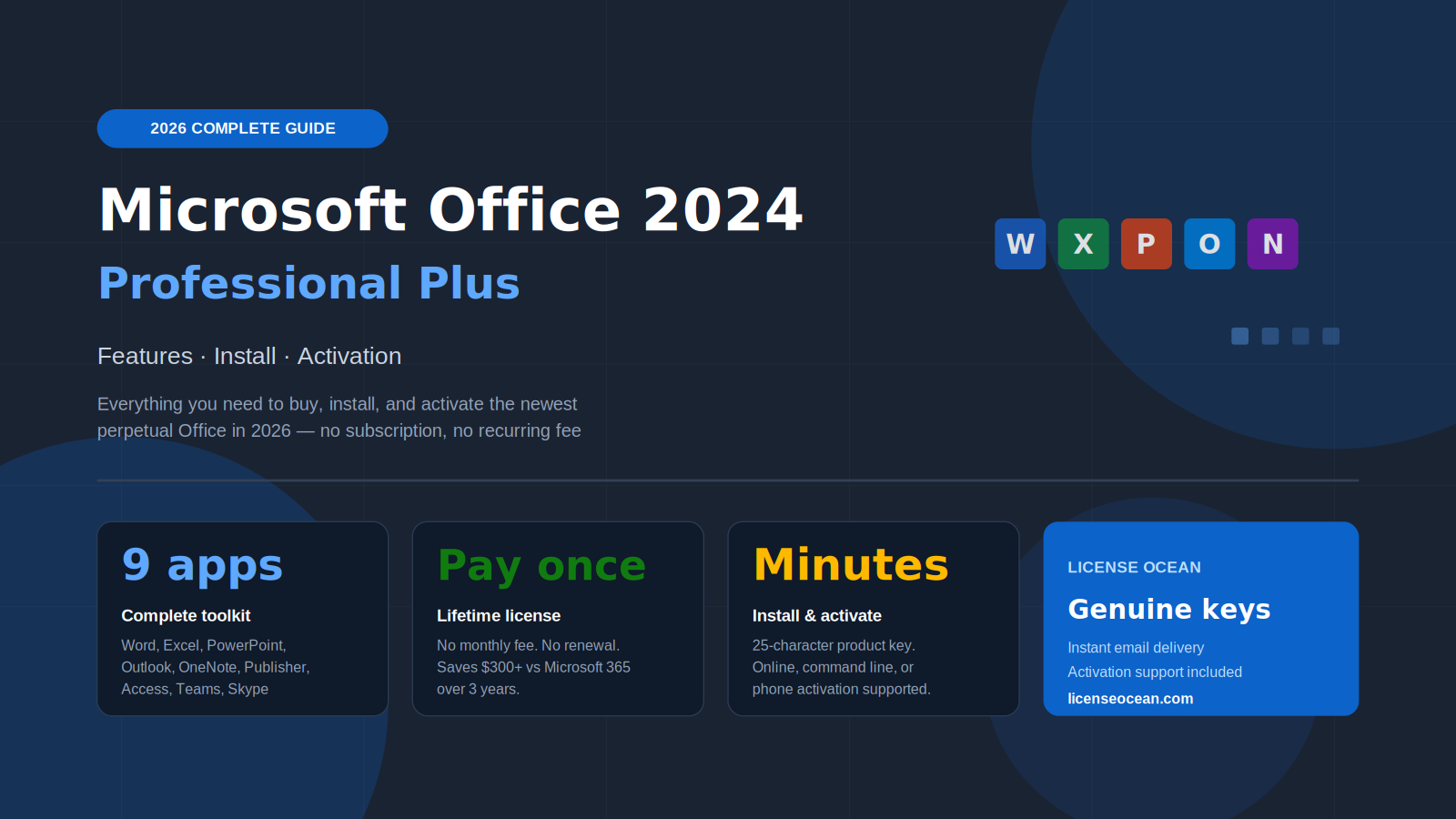
Microsoft Office 2024 Professional Plus is the newest one time purchase version of Microsoft Office for Windows. You pay once and own Word, Excel, PowerPoint, Outlook, OneNote, Publisher, Access, and Teams forever, with no subscription and no monthly fee. It installs on one Windows 10 or Windows 11 PC, activates in minutes with a single 25 character product key, and never expires. You can buy a genuine digital license from License Ocean with instant email delivery, usually within minutes of purchase.
You can buy Microsoft Office once and own it for good, or rent it from Microsoft for the rest of your life. That is the real choice behind Office 2024 Professional Plus. It is the newest version of Office you can buy outright, it installs the full professional toolkit on your PC, and it stays yours with no renewal date and no monthly charge.
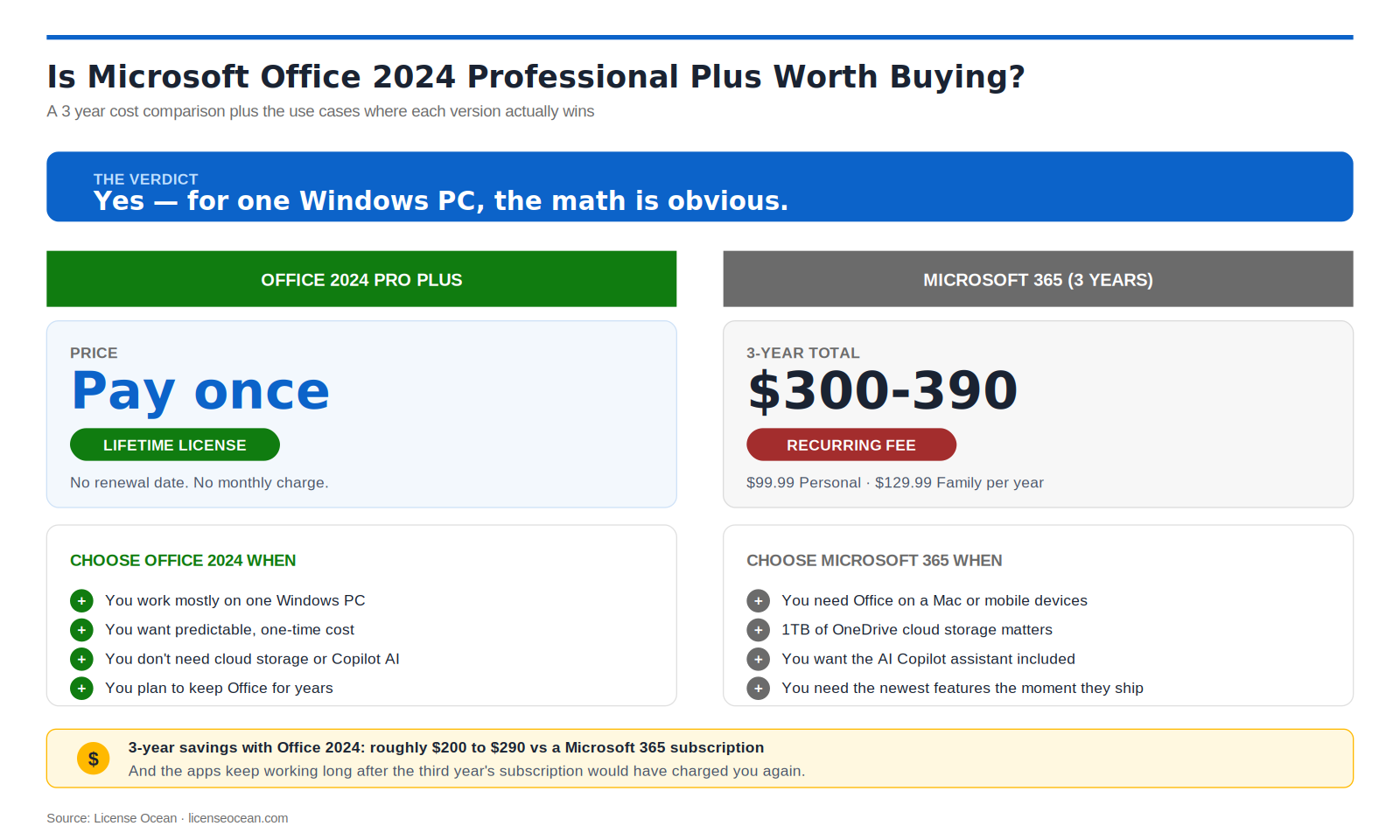
Here is the part Microsoft keeps quiet. A Microsoft 365 Family plan now costs $129.99 a year in the US, and a Personal plan runs about $99.99 a year at the standard rate. Office 2024 Professional Plus is a single payment that never comes back. Over three years that is roughly $300 to $390 in subscription fees against one purchase you keep.
This guide comes from the team at License Ocean, where we help people buy, install, and activate genuine Microsoft software every day. Everything below reflects the current 2026 reality, from the exact activation steps that work to the honest differences between Office 2024 and Microsoft 365. Whether you need to activate a fresh key in the next five minutes or you are still deciding which version to buy, you will find the answer here.
Suggested image. Alt text: “Microsoft Office 2024 Professional Plus apps open on a Windows 11 laptop”
Is Microsoft Office 2024 Professional Plus Worth Buying?
Yes, and the math is what makes it obvious. If you work mostly on one Windows PC and you already know you will use Office for years, a one time license is the cheaper path by a wide margin. You pay once, and the apps keep working long after a yearly subscription would have charged you three or four times over.
The value goes beyond price. You are not signed into a plan that can change, you are not tied to a renewal date, and your apps will not lose features if a payment fails. For a lot of people, that simplicity matters as much as the savings.
There is a fair case for Microsoft 365 too, and it is worth being honest about it. Choose the subscription if you need Office on a Mac, if you want full editing in the mobile apps on your phone or tablet, if you rely on a terabyte of cloud storage, or if you want the AI Copilot assistant and every new feature the moment it ships. Office 2024 has a fixed feature set, so it will not grow over time. For a single Windows machine where ownership and a predictable cost win, Office 2024 Professional Plus is the better buy.
What Is Microsoft Office 2024 Professional Plus?
Office 2024 Professional Plus is the latest perpetual release of Microsoft Office for Windows. Perpetual is the key word. It means a one time purchase, so you buy the license once, install it, and keep it for the life of that PC with no recurring fee. That is the opposite of Microsoft 365, which charges you again every month or every year for the same kind of apps.
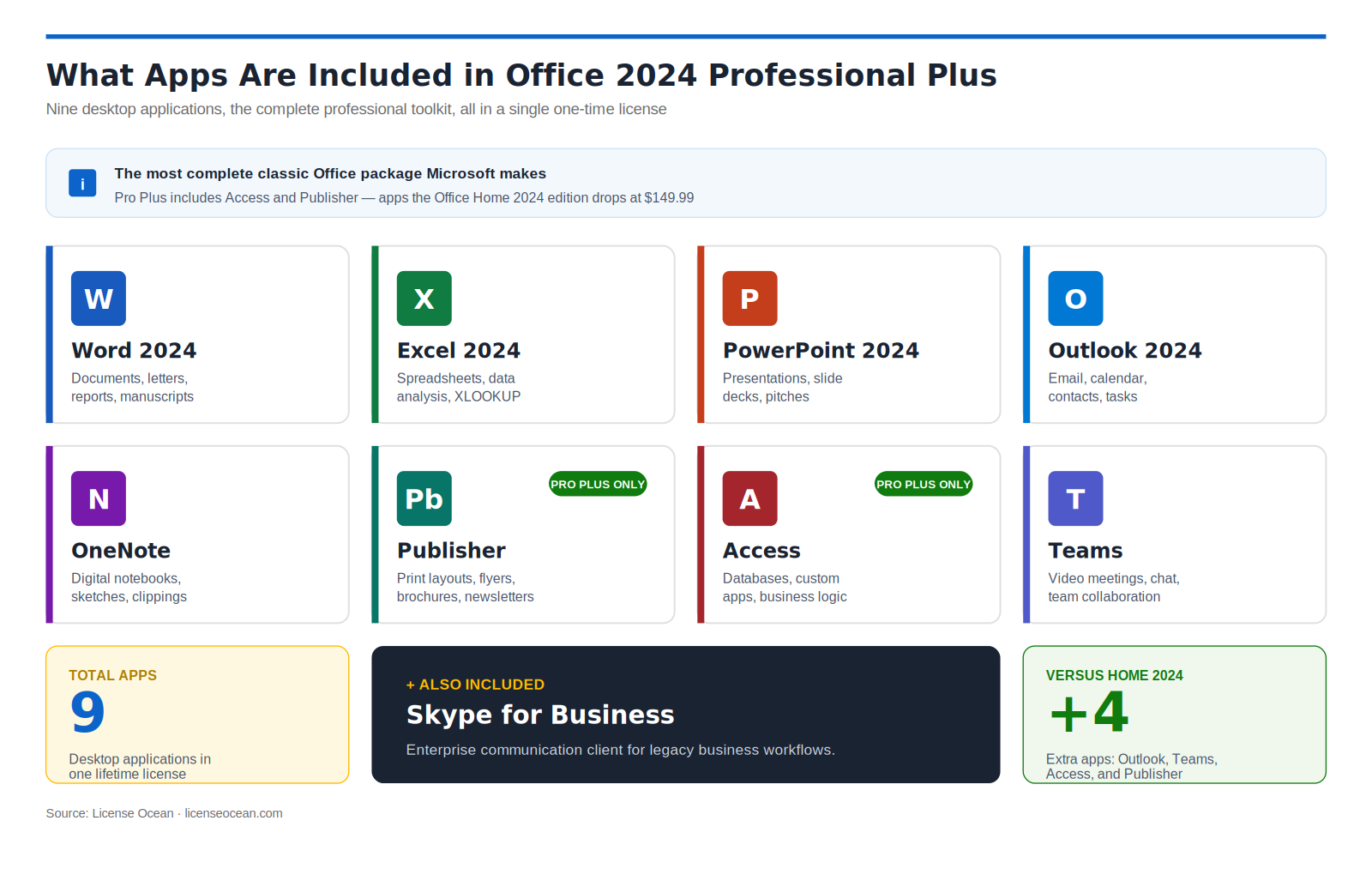
Professional Plus is the most complete classic Office package Microsoft makes. It includes the full desktop apps everyone knows, plus the business tools the Home editions drop, such as Access and Publisher. For comparison, the retail Office Home 2024 sells for around $149.99 but leaves out Outlook, Teams, Access, and Publisher. Professional Plus gives you the lot in a single license, which is why it is the version most professionals, small businesses, and power users look for.
What Is New in Office 2024
The first thing you notice is the look. Office 2024 ships with a new default theme built on Microsoft’s Fluent design, with rounded corners, refreshed icons, and a cleaner ribbon that feels right at home on Windows 11 while still looking modern on Windows 10.
Excel gets the biggest practical upgrades. You get improved dynamic arrays and modern lookup functions like XLOOKUP, along with support for hex color codes, so building and styling complex spreadsheets is faster and less fiddly. Word and PowerPoint gain smoother real time editing, with tighter OneDrive and SharePoint links and clearer version history when more than one person is working on a file. Outlook adds stronger phishing protection, and the whole suite starts faster and uses less memory, which you feel most on an everyday laptop rather than a high end desktop. Accessibility improves too, with better screen reader support and document checks that help you build files anyone can read.
One honest point that trips up a lot of buyers. The AI Copilot assistant is a Microsoft 365 feature, and it is not part of Office 2024. Microsoft sells Copilot to businesses at about $30 per user a month, so it was never going to be bundled into a one time license. If Copilot is essential to you, buy Microsoft 365. If you want a complete, modern Office you own outright, Office 2024 is the one.
Suggested image. Alt text: “Fluent design ribbon and refreshed interface in Office 2024 Word and Excel”
What Apps Are Included in Office 2024 Professional Plus
Professional Plus is the full set, not a trimmed version. You get the complete desktop toolkit:
Word 2024 for documents
Excel 2024 for spreadsheets and data analysis
PowerPoint 2024 for presentations
Outlook 2024 for email and calendar
OneNote for notes
Publisher for layouts and flyers
Access for databases
Microsoft Teams and Skype for Business for communication
The lighter Office 2024 Standard edition covers the core apps but drops Access and Publisher, so if you build databases or design print layouts, Professional Plus is the version you actually need.
System Requirements
Before you install, run a quick check against the minimums below. Office 2024 is not heavy software, and most PCs from the last few years will clear these comfortably.
Component
Minimum requirement
Operating system
Windows 10 version 1809 or later, or Windows 11
Processor
1.6 GHz, dual core, 64 bit recommended
Memory
4 GB RAM for 64 bit, 2 GB for 32 bit
Storage
4 GB of free disk space
Display
1280 x 768 resolution
Internet
Required for download and activation, not for daily use once installed
The one thing to watch is your version of Windows. Office 2024 will not run on Windows 7, Windows 8.1, or anything older, and this edition is Windows only, so it does not work on Mac, Android, or Chromebook.
Office 2024 vs Microsoft 365 vs Office 2021
Three versions, one decision. This table lays out the differences that actually change the buying choice.
Feature
Office 2024 Pro Plus
Microsoft 365
Office 2021 Pro Plus
License type
One time, perpetual
Subscription
One time, perpetual
Ongoing cost
Pay once
$99.99 to $129.99 a year
Pay once
Feature updates
Fixed set, security updates
Continuous new features
Fixed set, security updates
Newest apps
Yes, 2024 versions
Yes, always latest
Older, 2021 versions
AI Copilot
No
Yes, included or add on
No
Best for
Newest Office, no subscription
Cloud, mobile, and Copilot
Tightest budget
Pick Office 2024 when you want the newest apps without a subscription. Pick Microsoft 365 when cloud storage, mobile editing, and Copilot are worth a yearly fee. Office 2021 only makes sense if you find it cheaper than 2024 and the slightly older apps do not bother you.
How to Download Microsoft Office 2024 Professional Plus
Downloading the installer is the easy part, and it takes only a few minutes once your key is in hand.
Open Services and Subscriptions and find your Office purchase.
Click Install, then Install Office to start the download.
Look for a file named OfficeSetup.exe in your Downloads folder.
Setting Office up across several machines? You can use the Office Deployment Tool with a small configuration file pointed at the 2024 Professional Plus product. For a single home PC, you can skip that and use the standard installer.
Suggested image. Alt text: “Microsoft account Services and Subscriptions page with the Install Office button”
How to Install Office 2024 Professional Plus
Installation is quick, but one step trips people up more than any other, so start there.
Remove any old Office or Microsoft 365 trial from Settings first, then restart. Installing on top of an old version is the number one reason activation fails later.
Double click OfficeSetup.exe to launch the installer.
Click Yes when Windows shows the User Account Control prompt.
Let it run. The download and install usually take 10 to 25 minutes depending on your connection.
Open Word, Excel, or any app from the Start menu once it finishes.
How to Activate Office 2024 Professional Plus
You have three ways to activate, and online is the one to try first because it works for almost everyone.
Online activation
Open any Office app, for example Word 2024.
Go to File, then Account, then Activate Product.
Choose Enter a product key.
Type your 25 character key, shown in the format XXXXX XXXXX XXXXX XXXXX XXXXX.
Click Continue, and Office activates over the internet in seconds.
Command line activation
If the menu refuses the key for any reason, the command line almost always works. Open Command Prompt as administrator and run these three lines:
cd "C:\Program Files\Microsoft Office\root\Office16"
cscript ospp.vbs /inpkey:YOURKEY
cscript ospp.vbs /act
You can confirm the result with cscript ospp.vbs /dstatus, which shows the license status in plain text.
Phone activation for offline PCs
No internet on the machine? Pick the telephone option in the activation wizard. You read out an Installation ID, get a Confirmation ID back, and type it in to finish. Businesses running many machines can also use KMS or MAK activation, but for a single retail key, online activation is faster and simpler.
Suggested image. Alt text: “Office activation window prompting for a 25 character product key”
Troubleshooting Common Activation Problems
Activation usually just works. When it does not, the cause is almost always one of these.
A “key already in use” message means the key has already activated its one allowed PC. If that was your own machine before a Windows reset, your seller can reset the key so you can activate again.
A “not genuine” warning or reduced functionality mode simply means Office has not activated yet. Re enter the key and confirm no old Office version is still hanging around on the system.
If activation fails outright, check your Windows version. Office 2024 will not activate on Windows 8.1 or older.
When in doubt, copy the key straight from your delivery email rather than typing it, since a single wrong character is enough to stop it.
Is It Safe to Buy a Cheap Office 2024 Key?
The honest answer is yes, with one condition: buy from a seller you can trust. A genuine product key activates directly through Microsoft and unlocks the full version of Office 2024 Professional Plus. The apps, the updates, and the features are identical to a key bought at full retail price. What changes is how the license is sourced, not what you receive.
That is also why the price can be so much lower than Microsoft’s own store, and it is a fair question to ask before you pay. The risk is never the key itself, it is buying from a place with no support and no guarantee if something goes wrong.
When you buy from License Ocean, your genuine key arrives by email within minutes, along with clear setup steps and real help if activation ever gives you trouble. A fair price, instant delivery, and someone to call is what turns a cheap key from a gamble into a smart purchase.
Where to Buy Office 2024 Professional Plus
Ready to buy? You can get Microsoft Office 2024 Professional Plus as a genuine digital license for one PC, with instant email delivery and a lifetime activation, from License Ocean. If you also run a server or need an older release, License Ocean stocks Windows Server licenses and earlier Office editions too, so you can sort out your whole setup in one place.
Frequently Asked Questions
Is Office 2024 Professional Plus a one time purchase or a subscription?+
It is a one time purchase. You pay once and own it forever. Unlike Microsoft 365, it never expires and there is no monthly fee.
What apps are included in Office 2024 Professional Plus?+
You get Word, Excel, PowerPoint, Outlook, OneNote, Publisher, Access, Microsoft Teams, and Skype for Business in their 2024 desktop versions.
Does Office 2024 Professional Plus work on Windows 10?+
Yes. It runs on Windows 10 version 1809 or later and on Windows 11. It is not supported on Windows 7 or Windows 8.1.
Can I upgrade from Office 2021 to Office 2024?+
Yes. Buy an Office 2024 key, uninstall Office 2021 if you prefer, then install and activate Office 2024. Your documents and settings stay intact.
How many devices can I install it on?+
A retail license covers one PC. The key activates a single device and the license stays with that PC.
Does Office 2024 Professional Plus include Copilot or AI features?+
No. The AI Copilot assistant is part of Microsoft 365. Office 2024 is a perpetual release with a fixed feature set, which is why it needs no subscription.
Is it safe to buy a cheap Office 2024 key online?+
It is safe when you buy from a trusted store that sells genuine keys with instant delivery and support, such as License Ocean. The key activates through Microsoft and unlocks the full version.
Does the license expire?+
No. It is a perpetual license with no expiry date and no renewal fee.
How fast will I receive my key after buying?+
From License Ocean, your genuine key and setup instructions arrive by email, usually within a few minutes of your purchase being confirmed.
Can I reinstall Office 2024 if I reset my PC?+
Yes. You can reinstall on the same PC and reactivate with your key. If activation is blocked after a Windows reset, contact your seller and the key can be reset for you.
Is Office 2024 Professional Plus available for Mac?+
No. This edition is for Windows only. It does not run on Mac, Android, or Chromebook.
Ready to Upgrade to Office 2024?
License Ocean supplies genuine Microsoft Office 2024 Professional Plus as an instant digital license for one PC, delivered to your inbox within minutes and backed by real activation support. Whether you are setting up one home computer or licensing software across a small team, you get the full version, a lifetime license, and help whenever you need it. Browse Microsoft Office 2024 Professional Plus on License Ocean, or take a look at the wider range of Windows and Windows Server licenses to get your whole setup sorted in one place.